Boho Colors Spring Digital Papers: A Versatile Resource for Creative Projects
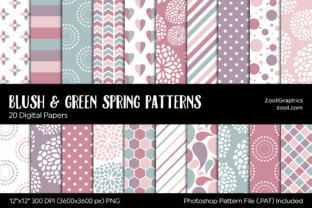
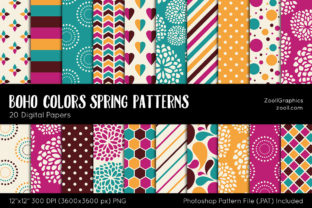
Boho Colors Spring Digital Papers offer a vibrant and versatile collection of patterns designed to elevate your creative projects. Whether you're crafting party invitations, embellishing planners, or designing scrapbook pages, these digital papers provide a rich palette of colors and designs that can transform any project into something special. With 20 seamless tileable patterns in dots, stripes, flowers, hearts, paisley, and more, this collection is perfect for anyone looking to add a touch of springtime charm to their work.
These digital papers are available in a high-quality ZIP file containing 20 PNG files at 300 dpi resolution, each measuring 12 x 12 inches (3600 x 3600 px). The package also includes a PAT file for Photoshop users, making it easy to integrate the patterns into your design workflow. The color palette features shades of pink, orange, turquoise, and brown—colors that evoke the essence of spring and are ideal for creating fresh, inviting designs.
Why Choose Boho Colors Spring Digital Papers?
Boho Colors Spring Digital Papers stand out due to their versatility and quality. The inclusion of multiple pattern types ensures that there's something for every creative need. From subtle dots to bold paisleys, these designs can be used as backgrounds, accents, or even as standalone elements in your projects.
One of the key advantages of using digital papers like these is their ease of use. Unlike traditional paper crafts, which require cutting, gluing, and other manual steps, digital papers can be downloaded and applied instantly within design software. This makes them an excellent choice for both beginners and professionals who want to streamline their workflow without sacrificing quality.
Common Mistakes and How to Avoid Them
While Boho Colors Spring Digital Papers are a great resource, there are some common mistakes that users may make when choosing or using them. One such mistake is not checking the file format compatibility before downloading. Although the package includes a PAT file for Photoshop users, those who use other design tools may need to convert the PNG files manually. It’s important to ensure that your preferred design software supports PNG files or that you have the necessary plugins or converters.
Another common oversight is underestimating the importance of resolution when selecting digital papers. While 300 dpi is generally sufficient for most print projects, it’s crucial to verify that the intended use of the design requires that level of detail. For example, if you plan to use the pattern on a large banner or poster, a lower resolution might result in pixelation or loss of clarity.
Many creators also overlook the potential of combining different patterns from the collection. Experimenting with layering or blending various designs can lead to unique and eye-catching results. However, it’s essential to maintain a cohesive color scheme and avoid overwhelming the viewer with too many competing patterns.
What to Check Before Using Boho Colors Spring Digital Papers
Before diving into your creative projects with Boho Colors Spring Digital Papers, it’s wise to take a few moments to review the contents of the ZIP file. Ensure that all 20 PNG files are present and that the PAT file is included if you plan to use it in Photoshop. Additionally, check that the file names are clear and organized so that you can easily locate specific patterns when needed.
It’s also a good idea to preview the patterns in your design software before applying them to your project. This allows you to see how they look in context and make any necessary adjustments before finalizing your design. Previewing can help you identify any issues with alignment, scaling, or color contrast that might affect the overall appearance of your work.
Finally, consider the licensing terms associated with the digital papers. Some resources may restrict commercial use or require attribution, so it’s important to understand what you’re allowed to do with the content. If you plan to use these patterns for client work or sell products featuring them, make sure that the license permits such usage.
Practical Tips for Using Boho Colors Spring Digital Papers
To get the most out of Boho Colors Spring Digital Papers, start by organizing your collection in a way that makes sense for your workflow. You might want to categorize the patterns based on type (e.g., floral, geometric) or color palette. This can help you quickly find the right design when working on a new project.
Experiment with different applications of the patterns. Try using a subtle dot pattern as a background for text-heavy designs, or use a bold paisley pattern as an accent element in a more minimalist layout. The key is to balance the pattern with other design elements to create a visually appealing composition.
Don’t be afraid to customize the patterns to suit your needs. Many design tools allow you to adjust the size, opacity, or blending modes of a pattern to achieve the desired effect. This flexibility can help you create unique designs that reflect your personal style or brand identity.
Lastly, keep an eye on trends and updates in the world of digital design. New tools and techniques are constantly emerging, and staying informed can help you make the most of resources like Boho Colors Spring Digital Papers. Join online communities, follow design blogs, or participate in workshops to stay up-to-date with the latest developments in the field.
By avoiding common mistakes and following practical tips, you can unlock the full potential of Boho Colors Spring Digital Papers and create stunning, professional-quality designs that stand out from the crowd.