Checkerboard Patterns for Designers and Creators
Checkerboard patterns have long been a staple in design, offering a classic yet versatile aesthetic. Whether you're creating digital assets, print materials, or branding elements, seamless checkerboard patterns provide a clean, structured look that can elevate any project. These patterns are not just visually appealing—they also serve functional purposes in layout design, texture overlays, and background creation.
What Is Checkerboard?
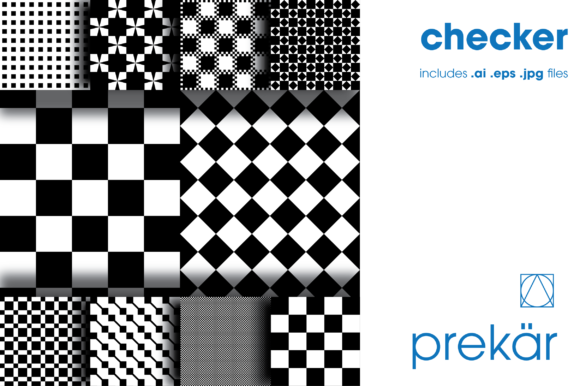
A checkerboard pattern is a repeating design composed of alternating black and white squares, typically arranged in an 8x8 grid. This geometric arrangement creates a balanced, symmetrical appearance that is both timeless and adaptable. In the context of graphic design, checkerboard patterns are often used as backgrounds, textures, or overlays to add depth and visual interest without overwhelming the main content.
The key feature of a checkerboard pattern is its seamless nature. This means that when tiled, the edges of the pattern align perfectly, creating a continuous surface without visible seams or breaks. Seamless patterns are essential for designers working on large-scale projects, such as website backgrounds, print layouts, or product packaging.
Why Different Audiences Care About Checkerboard Patterns
While all users may benefit from using checkerboard patterns, their priorities and applications vary significantly depending on their role and project needs.
Beginners and Hobbyists
For beginners, checkerboard patterns offer a simple way to experiment with design elements without requiring advanced technical skills. They can be used in personal projects like scrapbooking, DIY crafts, or social media content creation. The ease of use and visual appeal make them an excellent starting point for those new to design.
Beginners might prioritize ease of use and cost, looking for free or affordable resources. High-quality seamless .ai, .eps, and .jpg files are particularly valuable because they allow for easy customization and scaling without loss of quality.
Professionals and Creators
Professionals, including web designers, illustrators, and branding specialists, rely on checkerboard patterns for consistency and scalability. These patterns are often used in UI/UX design, where a clean, structured background enhances readability and user experience.
For professionals, quality and flexibility are critical. High-resolution vector files (.ai, .eps) ensure that patterns remain crisp at any scale, while raster formats (.jpg) are ideal for quick previews or low-resolution use cases. Professionals also value the ability to customize colors, sizes, and arrangements to fit specific brand guidelines or creative visions.
Business Owners and Marketers
Small business owners and marketers use checkerboard patterns to create visually engaging marketing materials, such as banners, social media graphics, and promotional posters. These patterns help maintain a cohesive brand identity across multiple platforms.
For this audience, commercial value and long-term usefulness are important considerations. A reliable, high-quality pattern can be reused across various campaigns, saving time and effort. Additionally, the ability to adapt the pattern to different color schemes or themes ensures versatility in branding efforts.
Educators and Freelancers
Freelancers and educators often need to produce consistent, professional-looking content quickly. Checkerboard patterns can be a valuable tool in teaching design principles or providing clients with ready-to-use assets.
Educators may focus on learning value and presentation, using checkerboard patterns as examples in design courses or tutorials. Freelancers, on the other hand, may prioritize speed and reliability, seeking patterns that can be easily integrated into their workflow without technical complications.
Choosing the Right Checkerboard Pattern
When selecting a checkerboard pattern, consider the following factors:
- Format: Choose between vector (AI, EPS) or raster (JPG) based on your intended use. Vector formats are ideal for scalable designs, while JPGs are better for quick previews or web use.
- Resolution: Ensure the pattern is high-resolution to avoid pixelation, especially if it will be used in print or large-scale digital projects.
- Customization Options: Look for patterns that allow flexibility in color, size, and layout to suit your specific needs.
- Seamlessness: Verify that the pattern tiles seamlessly to maintain a clean, uninterrupted look.
- License: Confirm whether the pattern is royalty-free or requires attribution, depending on how you plan to use it commercially.
By understanding your project goals and audience, you can select the most appropriate checkerboard pattern that meets your needs while delivering high-quality results.